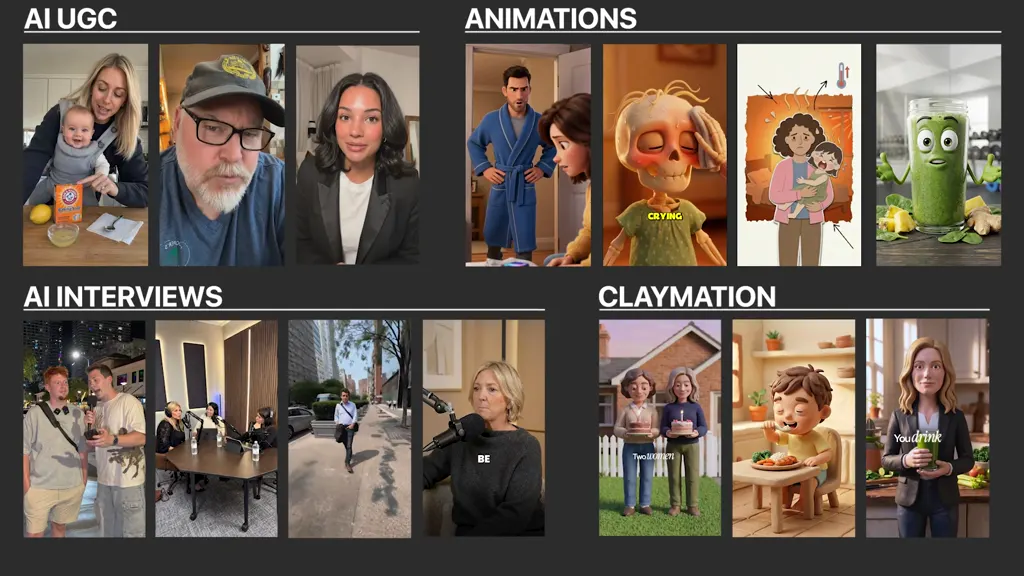
For People Who Tried AI Prompts, Watched AI UGC Videos... And Still Cannot Make Ads A Brand Would Actually Test

Get access to the exact AI UGC ad system trusted by 7-, 8-figure brands like Resilia, Rosabella, and Lymphoria to create, test, and scale profitable AI UGC ads without relying on “fiverr” ugc creators.

Get Instant Access For $47
Day-one AI ad result proof
Day-one top performer proof from the AI ad workflow.

Introduction

It is a confirmation and production system for turning ecommerce products into AI UGC ads a brand can understand, review, and test.

It shows you what to make, what to fix, and when an AI clip is not ready yet, so you stop guessing inside tools and stop sending plastic-looking videos.

This is the system that 7-fig brands use to scale AI ads: More ads. More hooks. More angles. More creative to test.

One small AI ad job can pay for this. No clients required to start building examples. No media-buying background required.

Tap Play On The AI UGC Examples Below

See the kind of fast, phone-native ads you learn to build for Meta, TikTok, Reels, or retargeting creative tests.

Read this if you:

  • You have tried prompts but still do not know what a brand would actually test.
  • Your AI videos look fake, stiff, plastic, or cheap.
  • You do not know how to turn a product into hooks, angles, and short scripts.
  • You know ecommerce brands need more ads, but you do not know the system behind testable creative.
  • You want to build examples before talking to potential buyers.
  • You want one repeatable sprint instead of guessing inside AI tools for hours.

What Is The AI UGC Ads System?

Its job is simple:

The AI UGC Ads System is a confirmation and production system built around the same creative loop ecommerce brands use when they need more ads to test.

It helps you turn one product into buyer pain, hooks, scripts, creator-style scenes, realistic AI outputs, and a simple test batch.

Instead of opening an AI tool and hoping the first clip looks real, you follow a clear process that tells you what should be on screen, what the first line should say, and what needs to be fixed before the ad is worth showing.

  • Product pain is pulled from the buyer, not guessed from a prompt.
  • Hooks and scripts are built before the AI scene is generated.
  • AI tells are checked before the ad goes into a portfolio or test batch.
  • This is not a magic client-getting system. It gives you a practical skill: turn products into ads brands can test.

Here Is Everything You Are Getting Today

You are not buying more random prompts.

You are getting the workflow for building AI UGC ads from the product up.

#1: Product Pain Mapping

Find the buyer problem, objection, desire, proof point, and buying moment before you write a hook or generate a scene.

#2: Hook And Script Engine

Turn one ecommerce product into problem-aware hooks, objection hooks, demo scripts, creator-style openers, and short ad structures.

#3: Creator-Style Scene System

Build normal rooms, natural phone framing, simple product moments, and believable UGC scenes instead of glossy AI commercials.

#4: AI Tell Fix Checklist

Catch plastic lighting, stiff delivery, weird hands, robotic voice, dead pacing, and over-polished scenes before they damage trust.

#5: Creative Test Batch Workflow

Turn hooks, scripts, scene prompts, and finished variations into a small batch a brand can understand and review.

Why This Skill Is Getting Paid Right Now

A 7-figure ecommerce brand does not win because one pretty video looks nice.

It wins because it tests enough creative to find the few ads that actually pull.

That means the brand always needs more hooks, angles, demos, objection ads, and new UGC styles before the old winners fatigue.

Human UGC is slow. Creators need briefs, product shipping, filming time, edits, reshoots, and revisions. Sometimes the brand waits two weeks for ads that still do not convert.

AI UGC changes the speed of production, but only if the person using it knows how to make the output look usable. This course teaches the operator layer between AI made a video and this is an ad worth testing.

The Simple Mechanism: The Angle-To-Ad Sprint

The system is built around one clear angle-to-ad sprint: turn one product angle into a batch of AI UGC ads a brand can test.

1

Pull The Product Pain

Find the buyer problem, the reason they care, the proof, the objection, and the moment that makes the product relevant. You do not start with the AI tool. You start with the buyer.

2

Write The Hooks And Scripts

Turn the product message into first lines, short scripts, problem angles, objection angles, demo angles, and creator-style ad structures. The goal is not a cool video. The goal is an ad with a reason to exist.

3

Build Creator-Style Scenes

Use normal rooms, simple phone-camera framing, natural pacing, product moments, and scene prompts that feel like UGC instead of a glossy AI commercial.

4

Fix The AI Tells

Clean up plastic lighting, stiff face movement, weird hands, dead delivery, bad rhythm, robotic voice, and scenes that feel too polished to trust.

5

Build The Creative Test Batch

Create hooks, scripts, scene prompts, finished ad variations, and a clear explanation of what each ad is testing. That is the difference between I made some AI videos and I made a creative test batch.

The Old Way Vs. The AI UGC System

Old way

  • Open an AI tool and hope the video looks real.
  • Make one clip with no hook, no script, and no clear reason to buy.
  • Send clips that look fake, stiff, or overproduced.
  • Make the brand guess what to do with the video.

AI UGC Ad Operator

  • Start with the product and the buyer pain.
  • Turn one product angle into multiple testable variations.
  • Fix the AI tells so the ad feels more natural.
  • Show what each variation is testing.

You Will Know What To Make And What To Regenerate

Most people do not hesitate because they lack another AI tool.

They hesitate because they cannot tell if what they made actually meets the standard.

The system gives you a simple way to judge the work: is the hook clear, is the product pain real, does the scene feel native, does the creator delivery feel believable, and is this variation testing one clear idea?

You stop debating with yourself. You see when the ad is ready enough to show, and you see when it needs another pass.

  • You know what to make first.
  • You know what to regenerate.
  • You know what to cut.
  • You know how to explain why each ad exists.

Included Resources And Bonuses

You also get simple resources that help you move from watching lessons to building your first ad batch.

Bonus #1: Hook Bank Framework

A simple way to turn buyer pain, objection, desire, demo, and proof into first lines you can actually test.

Bonus #2: Scene Prompt Swipe System

Creator-style scene structures for rooms, framing, product moments, natural pacing, and UGC delivery.

Bonus #3: AI Tell Fix Checklist

A realism checklist for lighting, hands, face movement, voice, rhythm, framing, and over-polished scenes.

Bonus #4: Portfolio Batch Blueprint

A clear way to build example batches from real ecommerce products before you talk to a brand owner.

How It Works

The goal is simple: turn one product into ads a brand can test.

1

Get Instant Access

Open the course and start with the sprint workflow. No subscriptions, no coding, and no media-buying background required.

2

Pick One Ecommerce Product

Use a real product page so the work is grounded in a buyer, a promise, a problem, and proof.

3

Build The Product Pain Map

Pull the problem, objection, desire, proof, product moment, and buyer context before you touch the AI video tool.

4

Create Hooks, Scripts, And Scenes

Turn the map into first lines, short scripts, creator-style scene prompts, and natural product moments.

5

Generate, Fix, And Batch

Create variations, remove the obvious AI tells, and finish with a small test-ready batch that shows what each ad is testing.

Here Is What Changes After You Implement

You are no longer hoping a random clip is good enough.

You know why the ad exists and what needs to happen next.

  • You analyze products faster because the buyer pain and angle are clearer.
  • You stop making one-off AI clips with no reason to buy.
  • You know when to sit out and regenerate because the output is not believable yet.
  • You create more variations from one product without waiting on creator shipping, filming, or reshoots.
  • You build examples that show a brand owner the hook, script, scene, ad variation, and test idea.
  • You can talk about the work in the language ecommerce brands already understand: more ads, more hooks, more angles, more creative to test.

The 5 Problems This Course Helps You Fix

If you are stuck, it is usually one of these five problems. The system is built to solve them in order.

ProblemWhat It Feels LikeWhat You Learn
No paid skillYou want to make money with AI but do not know what brands will pay for.How to make AI ads for ecommerce brands.
Fake videosYour AI clips look stiff, plastic, or cheap.How to make AI UGC look more natural and usable.
No hooksYou do not know what to say in the first three seconds.How to turn product pain into hooks and scripts.
Slow creativeBrands need more ads than creators can deliver fast.How to make more testable ad variations without waiting weeks.
No workflowYou do not know the system behind a creative test batch.How 7-figure brands turn angles into ads they can test.

Why The Price Is $47

This is priced to remove the excuse.

You are not joining a vague high-ticket AI coaching program. You are buying one practical system for one practical skill: turn product angles into AI UGC ads.

If you use it to build even one small paid AI ad job, the course can pay for itself.

But even before you talk to anyone, the first win is clarity. You will know what to make, how to make it, how to improve it, and how to explain it to a brand owner.

  • Five hooks.
  • Three short scripts.
  • Three AI UGC scene prompts.
  • Two to five finished AI ad variations.
  • One simple explanation of what each variation is testing.

Do Not Wait Until Every Brand Has A Cheap AI Ad Person

Right now, the market is in a weird gap.

Brands know AI ads are coming. They know creator-style ads still work. They know they need more creative to test.

But most people using AI video still make clips that look fake.

That gap is the opportunity. Learn the workflow while the demand is ahead of the talent.

Build examples. Show the work. Turn ecommerce products into AI ads brands can test.

One useful skill is enough to start.

FAQ

Can I use this to make money with AI ads?

Yes. That is the main use case. You learn how to make AI UGC ads, build examples, and show the system in a way ecommerce brands understand. This DOES GUARANTEE clients or income if you follow the system. You still have to build examples, show the work, and reach the right people.

Why would an ecommerce brand pay for this?

Because brands need more ads to test. Even a strong product can stall if the brand cannot test enough hooks, angles, demos, and UGC variations. You help them create more creative options faster.

What if my AI videos usually look fake?

That is one of the main problems this system helps solve. You learn how to improve scenes, prompts, pacing, delivery, lighting, voice, and structure so your output looks more natural and usable.

Is this just prompts?

No. Prompts are part of the system, but prompts alone are not the value. The real value is the workflow: find the angle, write the hook, build the scene, improve the output, and turn it into a testable ad batch.

Do I need clients already?

No. You can start by building examples. The goal is to make a small portfolio that shows a brand what kind of AI ads you can make.

Do I need to be a media buyer?

No. This is about making the ad creative. Media buying helps, but the skill here is turning a product into AI ad variations.

Do I need expensive tools or a team?

No. The system is built around a lean AI workflow. Start simple, get better at the process, then improve the quality as you go.

Will this work for my niche?

If the product can be sold with hooks, demos, pain points, proof, objections, or testimonials, the workflow can be adapted. Ecommerce is the main focus.

How fast can I make ads with this?

The product-page claim is that the workflow can turn one angle into a full library of AI ads in less than one hour. Treat that as a workflow benchmark after you understand the system, not a guarantee for your first attempt.

Do you guarantee I will get clients?

No. No course can promise clients or income. This gives you the workflow, examples, and production system so you can build a useful skill and show it to the right brands.